Getting FoundLocal.
Call
Visibility ToolSee a real report
Getting Found Local Visibility

See your Google Maps rankings
on a local heatmap.

Check where your business appears across nearby areas, see which competitors rank ahead of you, and use the report insights to decide what to review next.

Free 3×3 check · One search phrase · No card required

Google MapsChatGPTGemini
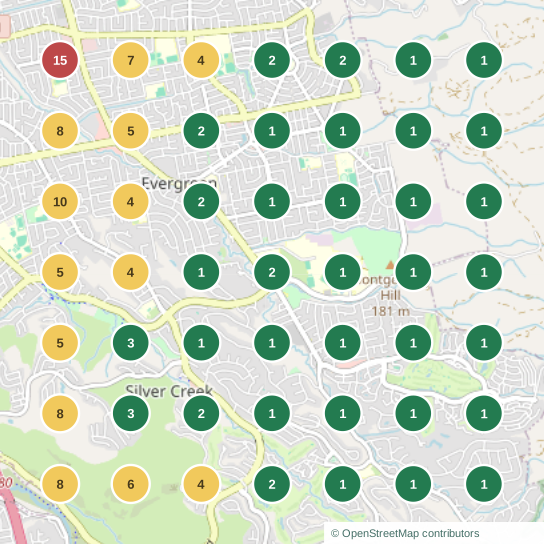
Google Maps ranking scanBlendz Barbershop
7 × 7 grid
Actual 49-location ranking scan for Blendz Barbershop
Top 3Rank 4–10Rank 11+
“barber shop” · San JoseView full size
Reporting tools

What your reports include

01 /

Google Maps rankings

See your position across your service area. Open any point to inspect the listings local customers can find.

02 /

Local competitor comparisons

Compare coverage, reach, and average rank using the same keyword and search locations.

03 /

ChatGPT and Gemini visibility

See whether ChatGPT and Gemini mention your business. Read returned answers and their available citations.

Compare the competition

See who gets found where you want to be.

Compare the listings appearing across the same search area. Open a competitor’s map to see where their coverage differs from yours.
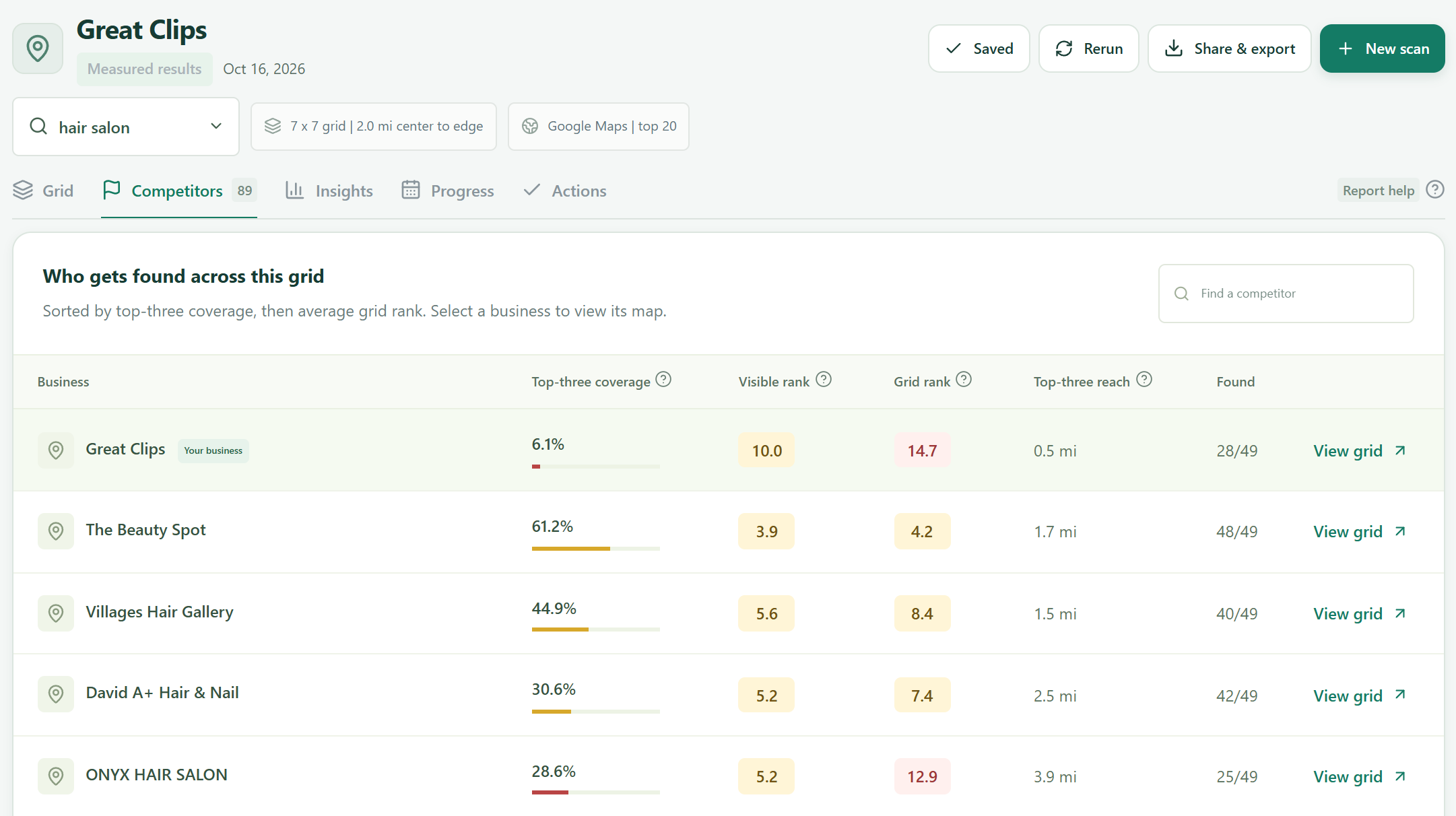
Great Clips and nearby competitors compared across the same 49 search locations
Great Clips · “hair salon” · October 16, 2026. Select to enlarge.
Scan insights

Identify areas that need attention.

Spot distance patterns, compare top-10 coverage, and find the points where another business is winning attention.

Add an AI report analysis for a focused plan tied to your scan. Reopen saved analyses at no extra cost.

Look inside the insights
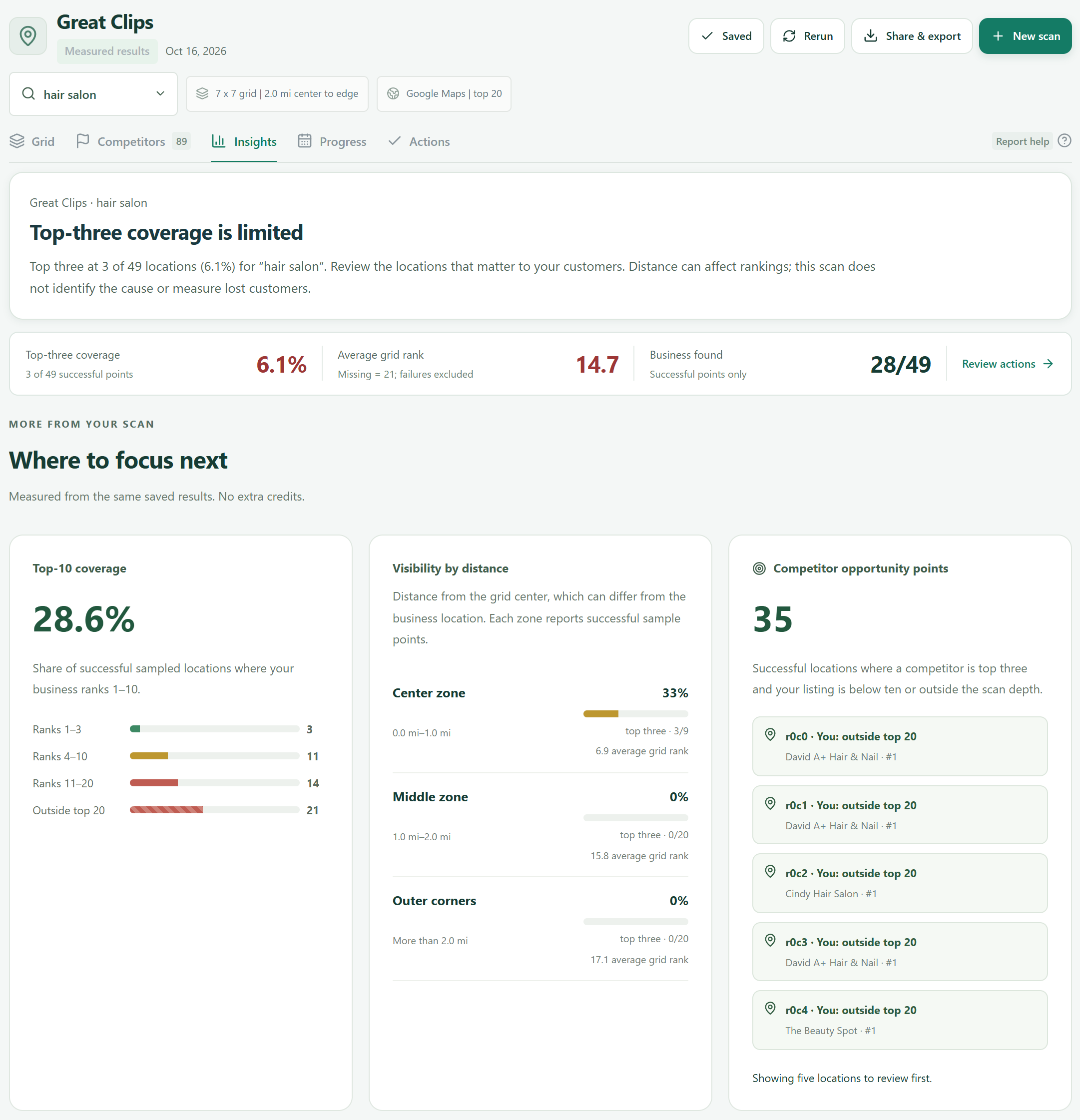
Great Clips 49-location report: rank distribution, visibility by distance, and competitor opportunity points.
Great Clips · “hair salon” · 49 locations · October 16, 2026. Open full size
A simple workflow

How to run your first scan

  1. 1

    Choose your business

    Find your business listing and enter a service someone would search for, such as “auto glass repair.”

  2. 2

    Set your search area

    Choose how far around your business to check. The grid sets how many locations we search; review the credit estimate before you scan.

  3. 3

    Turn results into a plan

    Open a map point to see your position and competitors. Use the report insights to choose what to review in your Google profile or website.

How the measurements work
Plans and scan credits

Choose monthly or annual billing.

Start at $19 monthly or $190 yearly. Every plan refreshes credits monthly, including annual plans.

Starter$19/monthor $190/year$15.83/month equivalent, billed yearly5,000 credits each month
Growth$39/monthor $390/year$32.50/month equivalent, billed yearly12,000 credits each month
Agency$79/monthor $790/year$65.83/month equivalent, billed yearly25,000 credits each month
Compare plans and credit costs

Questions about the Visibility Tool

Can I try it without paying?

Yes. Eligible new accounts can run one free 3×3 Standard scan using one search phrase, with nine included search locations. No card is required. You can also explore the real report preview without an account.

What do the results tell me?

Maps scans show rankings at sampled search locations. AI checks show name mentions in returned answers. Use these alongside calls, bookings, and enquiries to assess business results.

Do I need to connect my Google account?

No. Select the public business listing you want to scan. Your scan history stays inside your account.

Get started

Run a visibility scan for your business.

Choose a service keyword, set your area, and review the credit estimate before you scan.

Check your Google Maps visibilityFree 3×3 check for eligible new accounts. No card required.

What can we help you find?

Search this website · Press Esc to close · Use Tab to choose a result
A practical place to start

Your free visibility review.

Tell Rayyan a little about your business. We’ll review your online presence and get back to you during working hours with a useful next step.

By sending this form, you share these details with Getting Found Local through Formspree so we can respond to your request. Please do not include passwords or sensitive account information. Every day, 8am–5pm Pacific.

Prefer email?

Let’s talk about your business

How should we get in touch?

Leave your email or phone number. Rayyan will follow up during working hours to discuss your question and the support you need.

Email Rayyan directlyCall (408) 461-5726
How would you like us to reply?

Call us instead

We’ll use your details to respond to this request. Sent to Getting Found Local through Formspree. Every day, 8am–5pm Pacific.